YouTube Channel Description Generator for Finance Channels
Generate SEO-optimized YouTube channel descriptions for finance creators. AI-powered tool with proven templates that help you attract subscribers and build authority.
Description Generator
Enter your channel details to generate SEO-optimized descriptions
* Results can take up to 15 seconds to appear
Ready to Dominate YouTube for Your Financial Brand?
Get expert YouTube SEO and video marketing strategies that turn views into revenue. Join dozens of financial brands growing with our proven evergreen content system.
Strategic YouTube SEO
Optimize your videos for search and suggested content algorithms
Evergreen Content Systems
Create content that continues to drive leads and revenue for years
Performance Tracking
Monitor key metrics and optimize your content for maximum ROI
What is a YouTube Channel Description?
A YouTube channel description is the "About" section that appears on your channel's main page. It's one of the first things potential subscribers see when they visit your channel, and it plays a critical role in helping viewers understand who you are and what value you provide.
Your channel description appears in multiple places on YouTube. It's visible on your channel's "About" tab, in YouTube search results when your channel appears, and when viewers hover over your channel name in certain contexts. This makes it a powerful tool for both discovery and conversion.
For finance creators, a professional channel description is especially important. Viewers need to trust that you're credible before they'll take financial advice from you. A well-crafted description immediately establishes your expertise, explains your content focus, and sets expectations for what subscribers will learn. YouTube recommends optimising your channel description with relevant keywords, as complete and keyword-rich descriptions help improve your channel's visibility in search results.
Why Your YouTube Channel Description Matters
Your channel description serves three critical functions that directly impact your channel's growth and credibility.
First, it's a primary SEO signal. YouTube's algorithm reads your description to understand your channel's focus and determine when to show it in search results and recommendations. Including relevant keywords—especially in the first 150 characters—significantly improves your chances of being discovered by viewers searching for finance content.
Second, it builds trust and authority. Finance content requires credibility. Viewers need to believe you're qualified to provide financial guidance before they'll subscribe or follow your advice. A professional description that clearly communicates your expertise, credentials, and content focus establishes that trust immediately.
Third, it drives conversions. A compelling description with a clear call-to-action (CTA) can turn casual visitors into subscribers. By explaining what viewers will gain from subscribing—whether it's weekly investing tutorials, retirement planning strategies, or market analysis—you give them a reason to hit the subscribe button.
The challenge? Writing a description that balances SEO optimization, credibility, and persuasion is difficult. That's where our AI-powered generator comes in. It combines proven copywriting formulas with finance-specific best practices to create descriptions that perform. Explore our YouTube marketing services for more ways to grow your channel.
How to Use This YouTube Channel Description Generator
Using our YouTube Channel Description Generator is simple. Follow these four steps to create a professional, SEO-optimized description for your finance channel.
Step 1: Describe Your Channel Topic
In the first field, describe what your channel focuses on. Be specific about your niche within finance. For example: "Personal finance education for millennials, covering budgeting, investing, and debt payoff strategies" or "Stock market analysis and trading strategies for active investors."
Step 2: Define Your Target Audience (Optional)
If you have a specific audience in mind, enter it in the second field. This helps tailor the tone and language. Examples: "millennials new to investing," "retirees planning income," or "small business owners."
Step 3: List Key Topics (Optional)
Add any specific topics or services you want to highlight. This could include "index fund investing," "tax optimization," "retirement planning," or "cryptocurrency analysis."
Step 4: Generate Your Description
Click the "Generate Description" button. The tool will create a professional, SEO-optimized channel description in seconds. You can regenerate for different variations or copy the result directly to your YouTube channel.
YouTube Channel Description Template for Finance Creators
Before you use the generator, it's helpful to understand the structure of a high-performing YouTube channel description. Top finance channels follow a proven template that maximizes SEO, trust, and conversions.
Opening Hook (First 150 Characters): Start with a clear, keyword-rich statement about what your channel offers. This is the most important part because it appears in search results and above the "Show More" button.
Value Proposition (Next 100-150 Words): Explain what makes your channel unique and what viewers will learn. Highlight your expertise, credentials, or unique perspective. For finance channels, mention any relevant qualifications, years of experience, or specific methodologies you teach.
Content Schedule & CTAs: Let viewers know when you post new content and what action you want them to take. Example: "New videos every Tuesday and Friday. Subscribe and hit the bell icon to never miss an upload."
Links & Social Proof: Include links to your website, social media, and any relevant resources. If you have notable achievements (certifications, media features, subscriber milestones), mention them briefly.
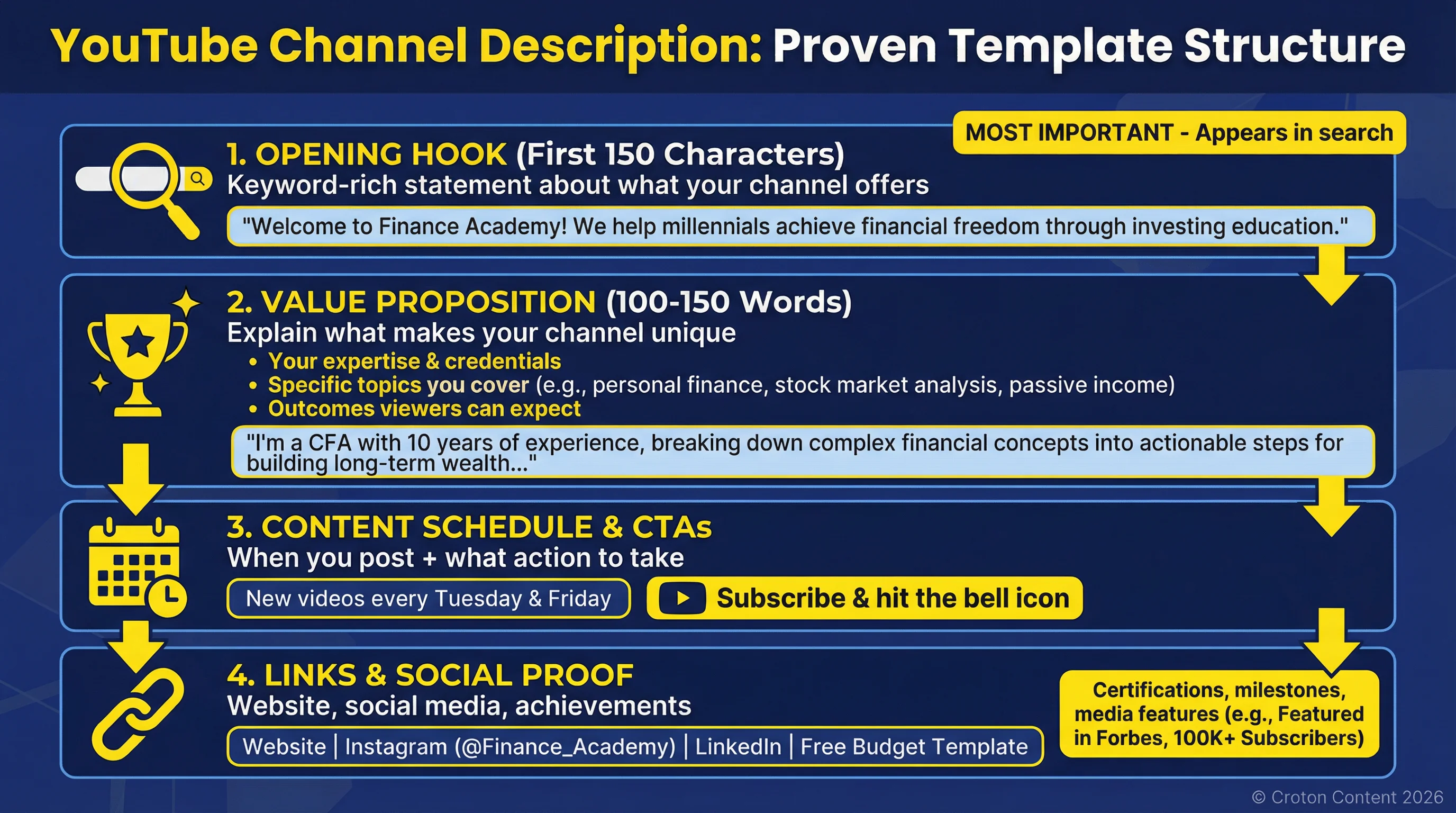
Follow this proven template structure to create channel descriptions that convert visitors into subscribers.
Once your description is ready, create professional thumbnails with our YouTube thumbnail generator or craft click-worthy titles with our YouTube title generator.
Best Practices for Writing YouTube Channel Descriptions
Follow these five best practices to create a channel description that attracts subscribers and ranks in search.
1. Front-Load Keywords
Place your most important keywords in the first 150 characters. This is what appears in search results and above the "Show More" button. Use your primary keyword naturally in the opening sentence. Use our YouTube tag generator to find the best keywords for your niche.
2. Be Specific About Your Niche
Don't just say "finance channel." Specify your focus: "dividend investing for retirees," "cryptocurrency analysis for beginners," or "tax strategies for small business owners." Specificity helps you attract the right audience and rank for targeted keywords.
3. Establish Credibility
For finance content, trust is everything. Mention relevant credentials, experience, or unique qualifications. If you're a CFA, CFP, CPA, or have relevant industry experience, say so.
4. Include a Clear CTA
Tell viewers exactly what to do next. "Subscribe for weekly investing tutorials" is more effective than a generic "Subscribe." Guide viewers toward your best content with links to popular playlists or your most valuable videos.
5. Add Necessary Disclosures
If you provide financial advice or promote products, include appropriate disclaimers. Example: "This channel is for educational purposes only and should not be considered financial advice."
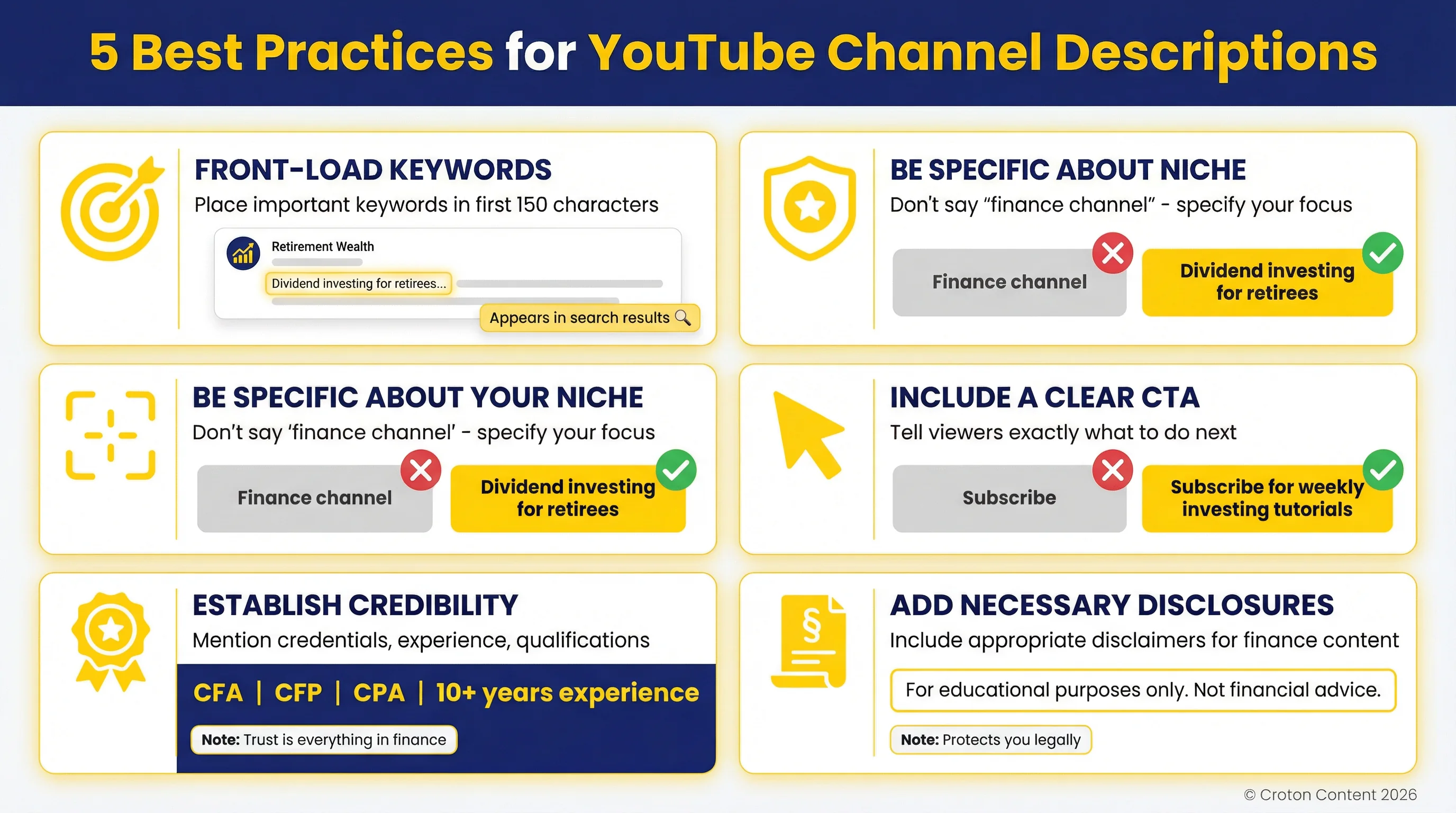
Apply these five best practices to create channel descriptions that rank in search and build trust with viewers.
Common YouTube Channel Description Mistakes to Avoid
Avoid these common mistakes that hurt your channel's discoverability and credibility.
1. Keyword Stuffing
Don't list keywords like tags or spam them unnaturally. Write for humans first, then optimize for search. A description that reads like "investing, stocks, finance, money, wealth" will hurt your credibility.
2. Being Too Vague
Generic descriptions like "Welcome to my finance channel where I talk about money" don't help viewers understand what makes your content valuable or unique.
3. Ignoring Mobile Optimization
Most YouTube viewers are on mobile devices. Keep your most important information in the first 150 characters because that's all mobile users see before clicking "Show More."
4. Forgetting to Update
Your channel description should evolve as your content does. If you expand into new topics, update your description to reflect that.
5. Missing Compliance Requirements
For finance channels, failing to include necessary disclaimers can create legal issues. If you provide investment advice, include appropriate disclosures about your qualifications and the educational nature of your content.
How to Add a Description to Your YouTube Channel
Adding or updating your channel description is straightforward. Here's how to do it in YouTube Studio.
Step 1: Log in to YouTube and click your profile icon in the top right corner. Select "YouTube Studio" from the dropdown menu.
Step 2: In the left sidebar, click "Customization," then click the "Basic info" tab at the top of the page.
Step 3: Scroll down to the "Description" field. Paste your generated description here. You can use up to 1,000 characters, but focus on making the first 150 characters count.
Step 4: Click "Publish" in the top right corner to save your changes. Your new description will appear immediately on your channel page. If you're setting up a new channel, also use our YouTube channel name generator to find the right name for your brand.