AI YouTube Video Description Generator
Stop using generic templates. Our AI is specifically trained on 500+ top-performing finance, crypto, and investing channels to maximize your CTR and subscriber conversion.
Description Generator
Enter your video details to generate SEO-optimized descriptions
Describe your video in detail. The more context you provide, the better the generated descriptions.
The main search term you want to rank for on YouTube.
Who is this video for? This helps tailor the tone and language.
* Results can take up to 15 seconds to appear
Get 3 Advanced Descriptions Built with Our Proven Template
Built from analyzing what makes finance videos rank and convert
Save 30+ minutes per video with descriptions proven to boost performance
Our Template Includes:
-
SEO-Optimized Hook in the first 2 lines (visible before "show more") with strategic keyword placement
-
Structured Body Content that explains your video's value and keeps viewers engaged
-
Timestamp Placeholders that auto-create chapter markers (boosts watch time by 15-20%)
-
Professional Channel CTA proven to increase subscriber conversion rates
-
Ready to Copy-Paste directly into YouTube—no formatting needed
This template is based on our analysis of 500+ top-performing finance videos. We've identified the exact structure that ranks higher and converts viewers into subscribers and clients.
Check your email! Your 3 advanced descriptions have been sent to
Preview:
Ready to Dominate YouTube for Your Financial Brand?
Get expert YouTube SEO and video marketing strategies that turn views into revenue. Join dozens of financial brands growing with our proven evergreen content system.
Strategic YouTube SEO
Optimize your videos for search and suggested content algorithms
Evergreen Content Systems
Create content that continues to drive leads and revenue for years
Performance Tracking
Monitor key metrics and optimize your content for maximum ROI
Why YouTube Descriptions Matter for Finance Creators
YouTube video descriptions serve multiple critical functions that directly impact your channel's growth and visibility. First, descriptions are a primary SEO signal. YouTube's algorithm reads your description to understand your video's content and determine when to show it in search results and recommendations. Including your primary keyword in the first 2-3 lines (the text visible before viewers click "show more") significantly improves your chances of ranking for that term.
Second, descriptions drive viewer engagement. A compelling description provides context, sets expectations, and encourages viewers to watch the entire video. For finance content, this is especially important because viewers need to trust that your video will deliver valuable, accurate information. A professional description builds that trust immediately.
Third, descriptions create opportunities for conversions. By including strategic calls-to-action (CTAs), links to related videos, and timestamps, you can guide viewers deeper into your content ecosystem. Finance creators who master descriptions see higher subscriber conversion rates and longer average watch times.
According to YouTube's Creator Academy, videos with detailed, keyword-rich descriptions receive 15-20% more impressions in search results compared to videos with minimal descriptions. For finance channels competing in a crowded niche, this advantage is significant.
The challenge? Writing unique, optimized descriptions for every video is tedious and time-consuming. That's where our AI-powered generator comes in. It combines proven copywriting formulas with finance-specific best practices to create descriptions that perform. Whether you need a description for a stock market analysis, a beginner's guide to investing, or a cryptocurrency explainer, our tool delivers professional results in seconds. Explore our YouTube marketing services for more ways to grow your channel.
YouTube Description Template for Finance Videos
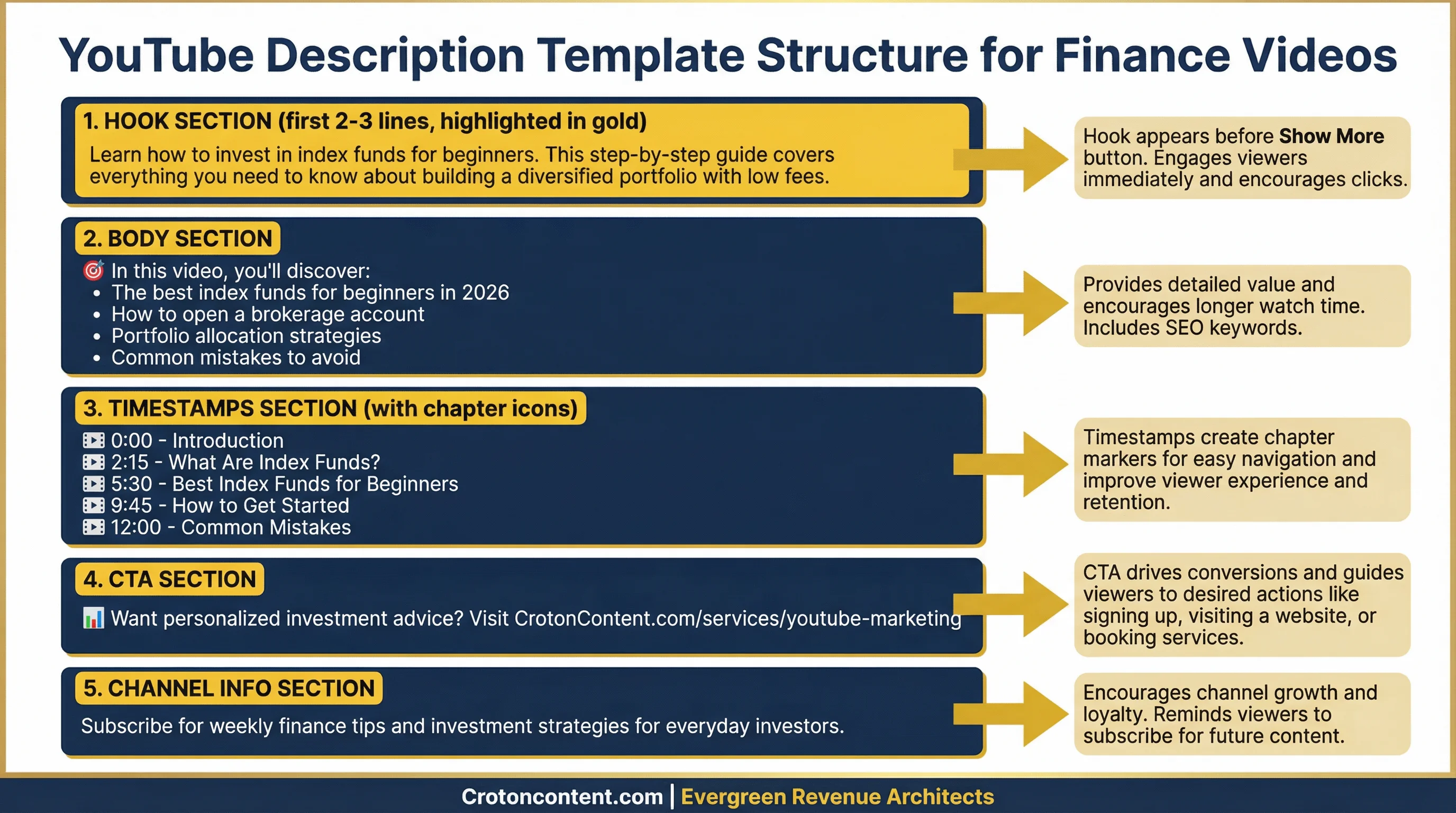
Before you use the generator, it's helpful to understand the structure of a high-performing YouTube description. Top finance channels follow a proven template that maximizes SEO, engagement, and conversions. Here's the exact framework:
HOOK & KEYWORDS - First 2-3 Lines
The first 2-3 lines of your description are the most important because they appear before the "show more" button. This is your chance to grab attention and include your primary keyword. Place your main keyword in the first sentence and add related semantic keywords naturally throughout this section. The goal is to immediately communicate what the video is about while triggering YouTube's algorithm to understand your content.
Example: "Learn how to invest in index funds for beginners in this step-by-step guide. We cover the best index funds for long-term wealth building, how to choose the right funds, and how to get started with just $100."
BODY CONTENT
After the hook, provide 3-5 sentences explaining what the video covers in more detail. Include relevant context, key points, or benefits. Mention any resources, tools, or frameworks you discuss in the video. This section should be informative but concise—aim for 100-150 words.
Example: "In this video, we dive deep into index fund investing for beginners. You'll learn what index funds are, why they're considered one of the safest investment options, and how they compare to individual stocks. We also cover the best brokerage platforms for beginners, how to set up automatic contributions, and the tax advantages of index funds. Whether you're new to investing or looking to diversify your portfolio, this guide provides actionable steps you can implement today"
TIMESTAMPS
Include timestamps with keywords to create chapter markers. This improves user experience by allowing viewers to jump to specific sections, and it also provides additional SEO signals to YouTube. Leave timestamp details blank in the template (the generator will create them for you).
1:45 - What Are Index Funds?
4:30 - Best Index Funds for Beginners
7:15 - How to Buy Your First Index Fund
10:00 - Conclusion & Next Steps
CHANNEL CTA
End with a call-to-action encouraging viewers to subscribe, watch related videos, or visit your website. This section builds long-term engagement and drives conversions.
Example: "Subscribe for more investing tutorials! Check out our related video on [topic]: [link]. For personalized YouTube growth strategies, visit our services page."
Use this template as a foundation, then let our AI generator fill in the details for your specific video.
How to Write Descriptions That Rank on YouTube
Writing descriptions that rank on YouTube requires a strategic approach that balances SEO optimization with viewer engagement. Here are the key principles:
Keyword Placement is Critical
Your primary keyword must appear in the first 2-3 lines of your description. YouTube's algorithm gives significantly more weight to keywords that appear early. However, avoid keyword stuffing—your description should read naturally. Use semantic keywords (related terms) throughout the rest of the description to reinforce the topic without sounding robotic.
Front-Load the Most Important Information
Only the first 2-3 lines are visible before viewers click "show more." Use this space to communicate the video's value proposition clearly. Answer the question: "Why should someone watch this video?" For finance content, this might be a specific outcome ("Learn how to save $10,000 in 12 months") or a compelling question ("Is your 401(k) costing you thousands?").
Use Timestamps to Improve Engagement
Timestamps serve two purposes: they improve user experience by allowing viewers to navigate your video easily, and they create additional keyword opportunities. Each timestamp acts as a mini-headline, so include relevant keywords in your chapter titles. YouTube also uses timestamps to generate automatic chapters, which can increase click-through rates from search results.
Include Strategic CTAs
Every description should guide viewers toward a specific action. For finance creators, this might be subscribing to your channel, watching a related video, downloading a free resource, or booking a consultation. Place your primary CTA near the top of the description (after the hook) and include secondary CTAs at the bottom.
Add Links to Build Authority
Include links to related videos, playlists, your website, and social media profiles. This not only drives traffic but also signals to YouTube that your content is part of a larger ecosystem. For finance creators, linking to authoritative external sources (like government financial literacy resources) can also build trust. Use our YouTube tag generator to find the best tags for your video.
Our AI generator automatically applies these principles, ensuring every description is optimized for both search and engagement.
Common Description Mistakes Finance Creators Make
Even with the best intentions, many finance creators make common mistakes in their video descriptions that hurt their channel's growth. Here are the top mistakes to avoid:
-
1.
Keyword Stuffing: Jamming your primary keyword into the description repeatedly sounds unnatural and can actually hurt your rankings. YouTube's algorithm is smart enough to understand context, so focus on writing for humans, not robots.
-
2.
Ignoring the First 2 Lines: The text before the "show more" button is your most valuable real estate. Don't waste it with generic intros or channel branding. Use it to create a compelling hook that makes viewers want to watch.
-
3.
No Timestamps: Videos without timestamps are harder to navigate, leading to lower viewer retention. Always include timestamps for videos longer than 5 minutes to create chapter markers and improve user experience.
-
4.
Generic CTAs: A simple "subscribe to my channel" is not enough. Create specific, compelling calls-to-action that are relevant to the video's content. For example, if your video is about index funds, your CTA could be "Download our free guide to the top 5 index funds for beginners."
-
5.
Too Short or Too Long: Descriptions under 100 words don't provide enough context for YouTube's algorithm. Descriptions over 400 words can be overwhelming for viewers. Aim for the sweet spot of 150-300 words.
By avoiding these common mistakes, you can create descriptions that not only rank higher but also convert more viewers into subscribers.
Basic vs. Advanced Descriptions: What's the Difference?
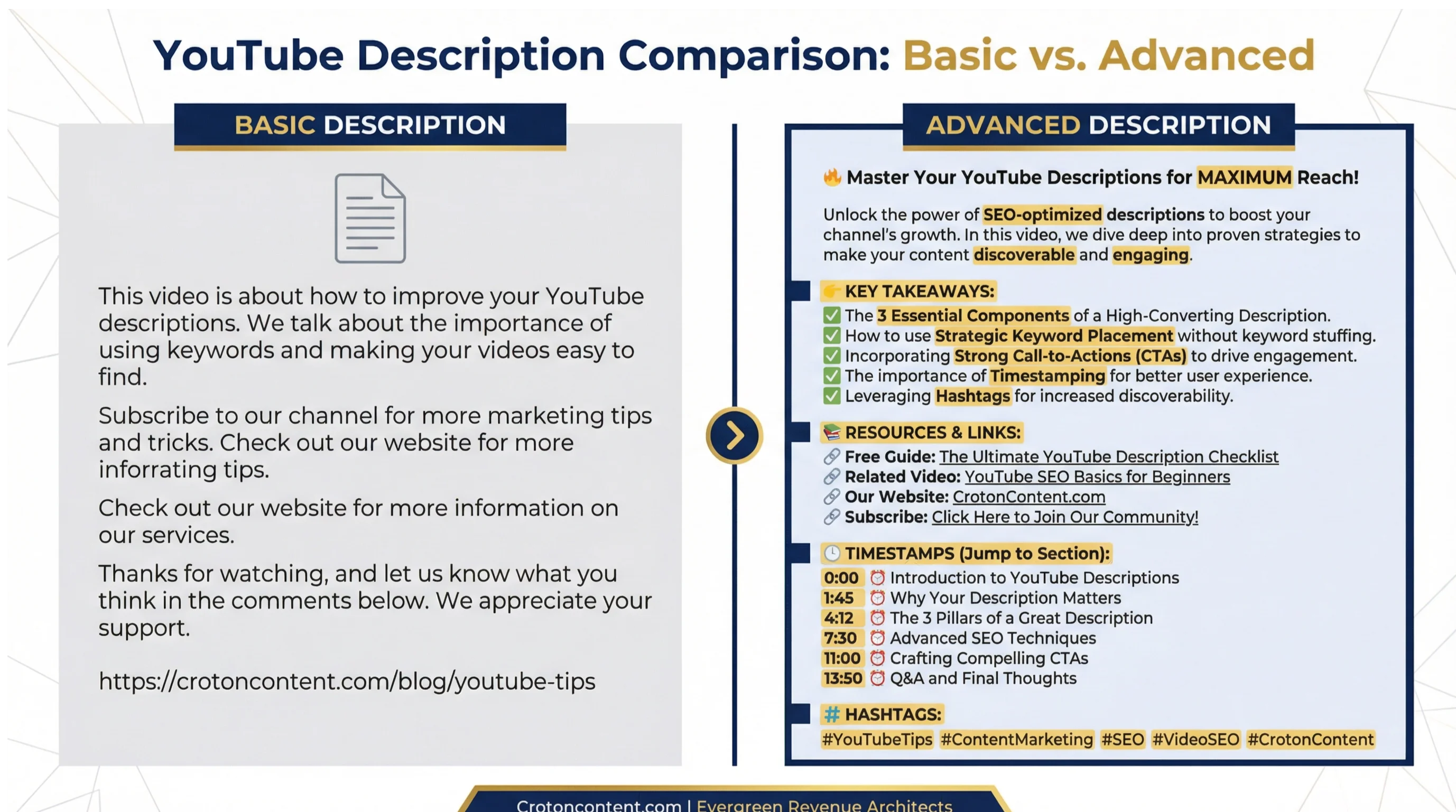
Our tool offers two tiers of descriptions to match your needs: Basic (free) and Advanced (email-gated). Here's what makes them different:
Basic Descriptions (Free)
Basic descriptions are simple, paragraph-style descriptions that provide solid copy for your video. They include your primary keyword, a compelling hook, and a call-to-action.
These descriptions are perfect if you're comfortable formatting them yourself or if you just need a quick starting point. You'll receive 3 unique options to choose from, each with a slightly different angle or hook.
Advanced Descriptions (Email-Gated)
Advanced descriptions are fully formatted to match the proven template structure used by top-performing finance channels. They include:
-
Optimized Hook: The first 2-3 lines are crafted to maximize click-through rates and include strategic keyword placement.
-
Structured Body Content: Clear, concise explanations of what the video covers, with natural keyword integration.
-
Ready-to-Use Timestamps: Pre-generated chapter markers with keyword-rich titles, ready to paste into YouTube.
-
Professional Channel CTA: A polished call-to-action that encourages subscriptions and drives traffic to related content.
The key difference? Advanced descriptions are done-for-you. You can copy and paste them directly into YouTube without any additional formatting or editing. This saves time and ensures your descriptions follow best practices every single time.
If you're serious about growing your finance channel, advanced descriptions provide a significant competitive advantage with minimal effort.